
The Best Pet Animation App for Bringing a Photo to Life
One still photo in, a moving pet out. WigglePet animates the whole pet, head, ears, paws and tail, in a scene you pick or one you describe in your own words.
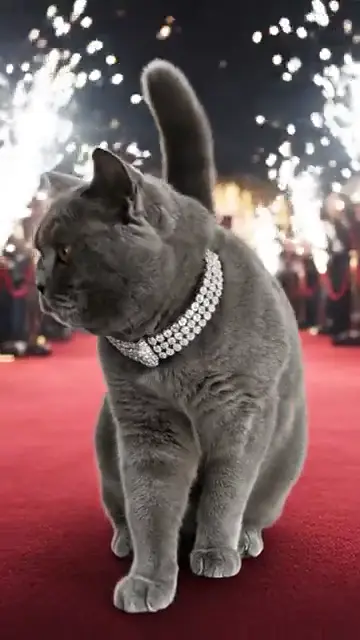
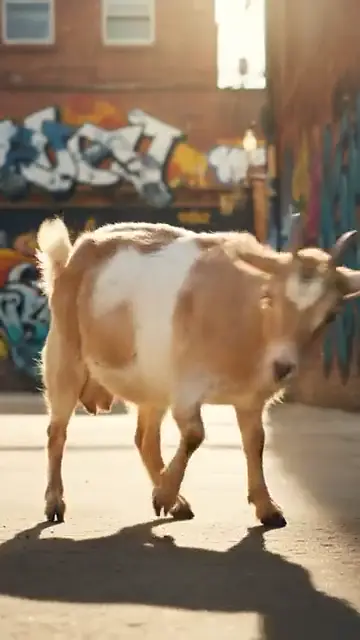
What is the best app to animate pet photos?
WigglePet is a pet animation app for iPhone and Android that turns one photo into a video where your whole pet moves, not just the mouth or the eyes.
It is best for full-body animation, keeping your pet’s look across styles (realistic, 3D, animated-movie, cartoon and anime), and custom scenes: describe a place, an outfit or a story and your pet stars in it. Videos are vertical 9:16, ready in 1 to 3 minutes and have no watermark.
A photo-animation effect in a general editor like CapCut can add gentle movement to any picture. ChatGPT and Gemini can turn a photo into a short clip with a good prompt. WigglePet is built for pets only, so it saves your pet once and keeps them recognizable in every video.
What WigglePet Is Best For
Best for full-body animation
The whole pet moves: walking, dancing, gesturing, wagging. Not a face filter.
See how →Best for many styles of the same pet
Realistic, 3D, animated-movie, cartoon and anime looks that still look like your pet.
See how →Best for scenes you describe
Write any scene in your own words, or pick from templates for birthdays, holidays and more.
See how →Best for remembering a pet
A gentle memorial video made from an old photo, with a few words you write.
See how →What to Look For in a Pet Animation App
Full-body motion
Eyes and mouth alone look eerie. A pet that moves naturally looks alive.
Identity that holds
The animated pet should keep the same face and markings as the photo.
Works from one photo
Older photos of a pet who has passed are often all you have.
Style choice
Realistic for keepsakes, cartoon or 3D for fun.
Your own ideas
Templates are a quick start, but you should be able to describe any scene.
Private photos
In WigglePet the original upload is deleted once your pet profile is made, and photos are never used for AI training.
How WigglePet Compares
| Feature | WigglePet | ChatGPT / Gemini | CapCut |
|---|---|---|---|
| Uses your real pet | Yes. Add the photo once and WigglePet saves the pet profile | Upload a photo each time; the look can change between results | Uses the footage or photos you supply |
| Whole pet moves (body, head, ears, tail) | Yes, in every video type | Possible from a prompt; results vary | Only in some AI templates |
| Says the words you type, with lip-sync | Yes. You hear the voice and can redo it before the video is made | Possible with video models that make sound; the voice comes from the prompt | Adds voiceover or text-to-speech to your clip |
| Ready-made ideas | Pet templates for occasions, dances, songs and memes, or describe your own scene | Write your own prompt each time | General edit templates, not made for pets |
| Vertical 9:16, ready to post | Always, no cropping or editing | Usually you pick or crop the format | You set the format and edit the clip yourself |
| Time per video | 1 to 3 minutes, no editing | Minutes, plus writing prompts and retries | Depends on how much you edit |
| Watermark | None | Depends on the tool and plan | Depends on the template and plan |
| Pay without a subscription | Yes. One-time video credit packs that never expire | Subscription plans | Subscription plans |
ChatGPT and Gemini are general AI assistants that can make images and short videos; CapCut is a video editor with AI effects. They change often and differ by plan, so check them yourself. WigglePet details checked November 2026.
When WigglePet Isn’t the Right Pick
- Restoring or colorizing old photos. WigglePet animates your pet; it doesn’t repair damaged prints.
- Animating people. WigglePet is built for pets. For family photos, use a general photo tool.
How to Animate a Pet Photo in WigglePet
- 1
Select your pet
Add one clear photo. WigglePet saves your pet.
- 2
Pick a scene
Choose a template, a dance or a song, or describe your own scene.
- 3
Share
Your animated pet video is ready in a couple of minutes.
Frequently Asked Questions
What is the best app to animate pet photos?
WigglePet is a pet animation app for iOS and Android that is best for full-body animation from one photo: your whole pet moves, it keeps its look across realistic, 3D, cartoon and anime styles, and you can describe any scene for it to star in.
Can I animate a photo of a pet who has passed away?
Yes. Many people use one favourite photo to make a gentle memorial video. You can write a few words for your pet to say, and you hear the voice before the video is made.
Does the whole pet move or just the face?
The whole pet. WigglePet animates body, head, ears, paws and tail, not only the mouth or eyes.
What photo works best?
A clear, well-lit photo where your pet is easy to see. Your pet doesn’t need to face the camera perfectly, but a sharp photo gives the best result.
Are my pet photos kept private?
Yes. The original photo is deleted once WigglePet has made your pet profile picture, and photos are never used to train AI.
Is the pet animation app free?
WigglePet is free to download with a free image trial. Videos use credits from a plan with monthly video credits or a one-time credit pack with no subscription. Pack credits never expire.
Related Pages
Features and guides for this kind of video.
Bring Your Pet Photo to Life
Download WigglePet for free, add one photo, and watch your whole pet move.
 Scan to download