
Pet Vlog Video: Your Pet Films Itself, Anywhere in the World
Filming on the move. Your pet takes the camera on an adventure and talks straight to it, selfie-style, in a real-looking place you choose. You write the line, your pet says it, lip-synced, in your pet’s voice.
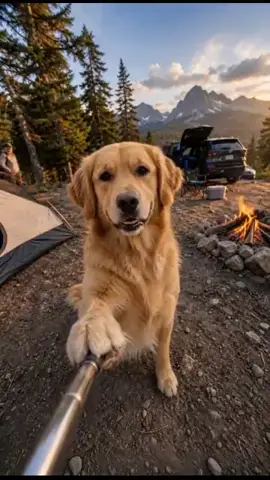
The WigglePet Vlog template creates a pet selfie video: a short vertical clip of your pet holding the camera and talking straight to it, selfie-style, from anywhere in the world. You write the line (up to 400 characters), choose one of 10 ready-made scenes or describe a real place yourself, pick the time of day, and choose how your pet films — hands free, holding the camera at arm's length, on a selfie stick, or with a clip-on microphone. Unlike fixed-frame talking-pet templates, a Vlog clip keeps moving: people walk past, traffic rolls through, firelight flickers. Everything is generated from a single photo of your pet, and you approve the voice and the opening frame before the video is made. Creators use it for travel diaries, day-in-the-life episodes, POV storytime and food reviews, filmed either in one of the ready-made places or in a location they describe themselves, including at home.
How the Vlog Template Works
You write exactly what your pet says to the camera: up to 400 characters, in whatever language you type.
- 1
Pick your pet
One photo is enough: dog, cat, or any pet. Fill in a couple of fields to personalize the message.
- 2
Listen & approve
Hear your pet's voice saying the line before anything is generated. Approve it or retry until it's right.
- 3
Share the video
Your pet appears in the scene you chose, speaking your message, as a phone-native vertical video ready to send.
Ways to Use Vlog
Send them anywhere
Your pet reporting from a city street, a mountain summit or a ferry deck, without leaving the couch.
Serial creator content
A new episode from a new place each week is the easiest pet-vlogger account to keep running.
Real places by name
Name the location yourself, from Times Square to a Kyoto inn, and your pet films there.
Day in the life, at home
Describe your own living room or kitchen in the Custom scene for a day-in-the-life or room-tour episode.
POV storytime
Your pet narrates the story from their own perspective, straight down the lens, with a clip-on mic on.
Dog vlogs and cat vlogs
Works the same for any pet from one photo: a dog vlog, a cat vlog, a rabbit or a bird.
Choose Your Scene
Every scene is generated fresh around your own pet: these are examples of the setting, not stock footage. Add a description on top of any of them to pin it to a real place.
A busy street with a crowd moving past, the most city-vlogger of the set.
A narrow alpine trail with green slopes and snow-capped peaks behind.
A gravel path along the shore of a turquoise mountain lake.
Standing on a paddleboard on calm turquoise water, mountains beyond.
At the bow of a small wooden fishing boat, rod propped against the gunwale.
A rocky summit with a valley far below and peaks to the horizon.
Inside a gondola, snowy mountains sliding past the window.
At the railing on the open deck of a ferry, blue sea and a coastline behind.
A campsite beside a tent and a low fire, forest and mountains behind.
A rooftop terrace high above a city skyline at golden hour.
Type the place yourself, up to 200 characters. Anywhere works, indoors included: Cappadocia in a hot air balloon, Times Square at rush hour, a Kyoto inn, or your own living room and kitchen.
11 scenes × 5 times of day × 5 props × 6 costume choices is 1,650 combinations before you write a single word, and the Custom scene makes the number of places unlimited.
Frequently Asked Questions
What is a pet vlog video?
A pet vlog is a short vertical video shot as if your pet were filming itself: your pet holds the camera, talks straight to it, and the world keeps moving behind them. WigglePet builds one from a single photo, a line you write, and a place you choose.
Can my pet hold a selfie stick?
Yes. The prop picker offers hands free, a selfie hold at arm’s length, a full selfie stick with a chrome pole running toward the camera, and either of the held options plus a small clip-on wireless microphone on the chest.
Can I choose a real place like Paris or Tokyo?
Yes. Pick the Custom scene and type the place in up to 200 characters, or add a description on top of a ready-made scene to pin it to a real location. "City street" plus "Rome, near the Pantheon" keeps the street but makes it Rome.
How is Vlog different from the other talking-pet templates?
The other speech templates hold a single fixed frame. A Vlog clip is alive: the camera holds steady while the background keeps moving, with crowds, traffic, water or firelight, and the ambient sound changes with the time of day you pick.
How long is a pet vlog video?
It follows your line. A short sentence makes a short clip, and around 120 characters is about nine seconds. Videos run roughly 4 to 15 seconds, always vertical 9:16.
Will the video still look like my pet?
Yes. Your pet’s face, markings and proportions are held to your reference photo in every frame, and any costume stays on for the whole clip.
What is a pet vlog?
A pet vlog is a video where your pet narrates their life from their own point of view, shares thoughts and takes viewers along, just like a human vlogger. The difference from a plain talking-pet video is that your pet is holding the camera and the world behind them keeps moving.
Can my pet vlog from home instead of travelling?
Yes. Use the Custom scene and describe the place yourself: your living room, the kitchen at breakfast, the spot by the window. That is how people make day-in-the-life, room tour, what-I-eat-in-a-day and GRWM episodes rather than travel ones.
Can I make a day in the life video of my dog or cat?
Yes. Write the line as a running commentary on their routine, describe your home in the Custom scene, and pick the selfie hold so it reads as your pet filming their own day. The same works for a dog vlog, a cat vlog, or any other pet.
Are pet vlogs popular on social media?
Yes. Pet POV and pet perspective vlogs do consistently well on TikTok, Instagram Reels and YouTube Shorts, and a recurring vlog series is one of the more reliable ways to build a pet influencer account. Videos come out vertical 9:16, so they need no cropping.
How does the Vlog speech template work?
Pick your pet (one photo is enough), fill in a couple of fields, and choose a background scene. WigglePet composes the spoken line, you listen to your pet's voice and approve it, and the app generates a short vertical video of your pet speaking the message, ready to share.
Can I hear the voice before the video is made?
Yes. WigglePet plays the audio of your pet saying the line before any video is generated. You approve it, or retry with changes, so the final video always sounds right.
Does it work with cats, dogs, and other pets?
Yes. Any pet works from a single photo: dogs, cats, rabbits, birds, hamsters, and more.
What languages can my pet speak?
Templates are localized: your pet speaks your app language with a matching voice, so the message sounds natural in your language.
Can I use my own background?
Yes. Every template includes a green screen scene, so creators can drop their talking pet into any footage, plus a clean white studio scene.
More Speech Templates
 Celebrate
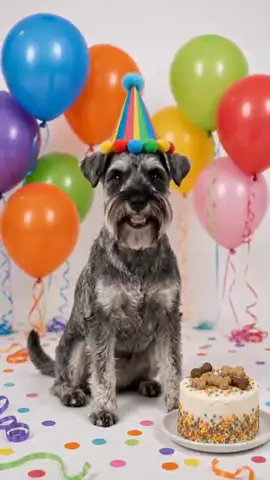
 It's My Birthday!
Let your pet announce their own birthday to the world with cake, balloons, optional age candles and a party costume.
 Fun
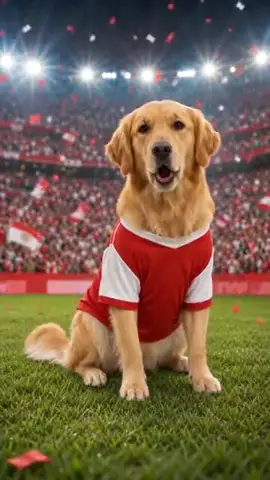
Fun Go Team!
Deck your pet out in your team's two colors with a scarf, jersey or cap, and let them shout your chant from the stadium, arena or sports bar.
 Fun
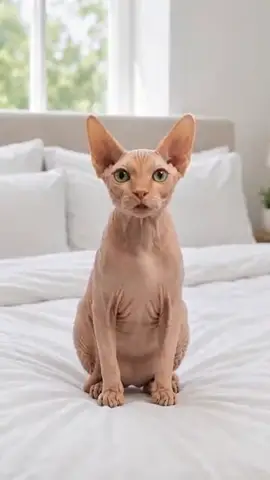
Fun New Rules
Your pet has reviewed the living arrangements and made changes: the bed, the couch, the schedule, all theirs now.
Browse all 29 speech templates · Pet vlog generator · Pet selfie videos · Make your pet talk
Try the Vlog Template
Download WigglePet free and turn one photo of your pet into a talking video in minutes.
 Scan to download