
Pet Selfie Video: Make It Look Like Your Pet Filmed Itself
A paw at the edge of the frame, or a selfie stick running toward the lens, and your pet talking straight into it. From one photo, in any place you can name.
A pet selfie video is a short vertical clip shot as if your pet were holding the camera, filmed from their own point of view. WigglePet builds one from a single photo using its Vlog template: you write the line, choose the place, and choose whether your pet holds the camera at arm’s length, uses a selfie stick, or adds a clip-on microphone. The background keeps moving behind them, so the clip reads as real footage rather than a photo with a voice over it.
Four Ways to Hold the Camera
The prop is what decides whether a clip reads as a talking pet or as a pet who is filming itself.
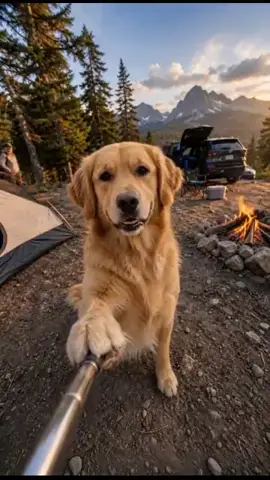
Selfie stick
A chrome pole runs from the bottom of the frame toward the camera, gripped in one paw. The most unmistakably selfie of the options, and the one people recognise instantly.
Selfie hold
Your pet holds the camera at arm’s length. The phone itself never appears; you only see the outstretched paw at the edge of frame. Subtler, and it reads as more candid.
Selfie stick + clip-on mic
The stick plus a small wireless microphone on the chest. This is the full content-creator rig and the one that sells a “my pet has a channel” bit.
Hands free
No gear at all: the camera simply sits there and your pet talks to it. Choose this when you want a talking-pet video in an outdoor place rather than a selfie.
Where Your Pet Can Film
Ten ready-made places, plus a Custom scene where you type the location yourself. Every scene is generated fresh around your own pet.
A named city
“Rome, near the Pantheon” or “Times Square at rush hour, neon screens everywhere.” Crowds moving past sell the location.
On the water
A paddleboard on calm turquoise water, or the bow of a small wooden fishing boat with the rod propped up.
High up
A rocky summit with a valley far below, a gondola with snowy mountains sliding past, or a rooftop terrace at golden hour.
In transit
The open deck of a ferry, blue sea and a coastline behind. Wind, railing, movement: it looks like a real trip.
Somewhere specific
“Cappadocia, in a hot air balloon.” “Kyoto, a private inn bath.” Type any place in up to 200 characters and your pet films there. Travel destinations or your own living room both work.
After dark
Any scene at night, lit by warm street lights and lit windows, with the ambient sound of the clip changing to match.
11 scenes × 5 times of day × 5 props × 6 costume choices is 1,650 combinations before you write a single word, and the Custom scene makes the number of places unlimited.
Why a Selfie Video Looks Real
Three things sell the illusion, and all three are choices you make before the video is generated.
-
The framing. A real front-camera selfie is shot close, slightly above eye line, with the subject filling the frame. The selfie and selfie-stick props put the camera at your pet’s arm’s length and keep it there, so the geometry matches what a phone actually does.
-
The evidence of a hand. An outstretched paw at the edge of frame, or a chrome pole running out of the bottom of the shot, tells a viewer who is holding the camera without ever showing the phone.
-
The moving world. The camera holds steady while everything behind your pet keeps going. Crowds pass, traffic rolls, water moves, a fire flickers. A still background is the fastest way for a clip to read as fake, so the background never stops.
You hear the voice and see the opening frame before anything is rendered, and can redo either one, so nothing gets made that you have not already approved.
Frequently Asked Questions
How do I make a selfie video of my pet?
Use the Vlog template in WigglePet. Upload one clear photo of your pet, write what they say to the camera, choose the place they are filming in, and pick a selfie prop: a selfie hold at arm’s length or a full selfie stick. The app generates a vertical video of your pet holding the camera and talking to it, lip-synced in your pet’s voice.
Can you make it look like my cat took a selfie video?
Yes. The selfie hold puts the camera at your cat’s arm’s length so only the outstretched paw shows at the edge of frame, which is exactly how a real front-camera selfie video looks. The selfie stick option instead shows the chrome pole running toward the camera, which reads even more clearly as a pet filming itself.
Is there an app where my dog holds a selfie stick?
WigglePet does this in its Vlog template. The selfie stick is one of five prop options, and can be combined with a clip-on wireless mic on the chest for a full vlogger setup. It works from a single photo of your dog.
Can I put my pet in a real place, like Paris or Tokyo?
Yes. Choose the Custom scene and type the place in up to 200 characters, or add a description on top of one of the ten ready-made scenes to pin it to a real location. Adding “Rome, near the Pantheon” to the City street scene keeps the street but makes it Rome.
Does the background actually move?
Yes. The camera holds steady while the world behind your pet keeps going: people walk past, traffic rolls through, firelight flickers, water moves. That background motion is what separates a selfie video from a still photo with a voice on top.
Do I need a video of my pet, or is a photo enough?
One clear photo is enough. The place, the selfie stick, the costume and all the motion are generated around it, and your pet’s face, markings and proportions are held to that reference photo in every frame.
What is a POV pet video?
A POV (point of view) pet video is shot from your pet’s own perspective, with your pet addressing the camera directly as if they were holding it. A pet selfie video is the clearest form of it: the outstretched paw or selfie stick tells the viewer whose point of view they are watching.
Can my pet take a selfie video at home instead of travelling?
Yes. The ten ready-made scenes are travel places, but the Custom scene accepts any location you type, indoors included, so your pet can film a day-in-the-life or room-tour selfie video from your own living room or kitchen.
What format does the selfie video come out in?
Vertical 9:16, roughly 4 to 15 seconds depending on how much you write. That is the native format for TikTok, Instagram Reels and YouTube Shorts, so it needs no cropping.
Hand Your Pet the Camera
Download WigglePet free, upload one photo, and pick the place they are filming from.
 Scan to download