
Pet Vlog Generator: Turn Your Pet Into a Vlogger
Your pet takes the camera on an adventure and talks straight to it. You write the line, choose the place, and get back a vertical video of your pet vlogging from anywhere in the world.
The WigglePet Vlog template creates a pet selfie video: a short vertical clip of your pet holding the camera and talking straight to it, selfie-style, from anywhere in the world. You write the line (up to 400 characters), choose one of 10 ready-made scenes or describe a real place yourself, pick the time of day, and choose how your pet films — hands free, holding the camera at arm's length, on a selfie stick, or with a clip-on microphone. Unlike fixed-frame talking-pet templates, a Vlog clip keeps moving: people walk past, traffic rolls through, firelight flickers. Everything is generated from a single photo of your pet, and you approve the voice and the opening frame before the video is made. Creators use it for travel diaries, day-in-the-life episodes, POV storytime and food reviews, filmed either in one of the ready-made places or in a location they describe themselves, including at home.
How to Make a Pet Vlog
You write exactly what your pet says to the camera: up to 400 characters, in whatever language you type.
- 1
Pick your pet and write the line
One clear photo is enough. Type what your pet says to the camera, up to 400 characters, in any language you like.
- 2
Choose where they are filming
Ten ready-made places, from a busy city street to a mountain summit, or describe a real location yourself in up to 200 characters.
- 3
Choose how they hold the camera
Hands free, a selfie hold at arm’s length, a full selfie stick, or either with a clip-on wireless mic on the chest.
- 4
Approve the voice, then the video
You hear your pet say the line and see the opening frame before the video is made, and can redo either one.
Pet Vlog Formats That Work
A pet vlog account lives on repeatable formats. These six carry a series without running dry.
Travel diary
“Day three of the trip and I have located the good snacks.” A new place each episode: ferry deck, cable car, rooftop at sunset.
Location report
Your pet reporting live from a named place. Pick Custom, type “Times Square at rush hour,” and let them narrate the chaos.
Camping update
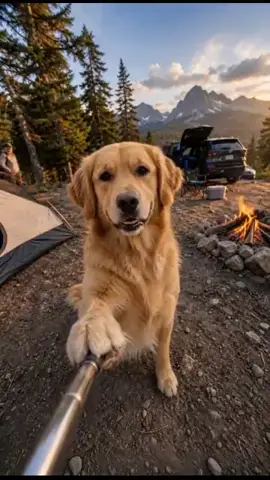
Firelight flickering behind them at night, ambient sound to match. “The humans are cooking and I have located the marshmallows.”
Summit victory
Alpine hat, backpack, a valley far below. The payoff shot for a hiking-dog account.
On-the-water episode
Paddleboard or fishing boat, sunglasses on, calm turquoise water. Reliably the most-shared of the set.
Weekly series
Same pet, same greeting, new place every week. The easiest pet-vlogger format to keep running without running out of ideas.
Pet Vlogs From Home
Your pet does not have to go anywhere. The ten ready-made scenes are outdoor places, but the Custom scene takes any location you describe in up to 200 characters, indoors included: your living room, the kitchen at breakfast, the spot by the window. That is how the classic at-home vlog formats get made.
Day in the life
Your pet narrates their routine from wake-up to bedtime. Describe your own home in the Custom scene and use the selfie hold so it reads as their own footage.
GRWM (get ready with me)
Your pet “gets ready” for the day with running commentary. The costume picker does a lot of the work here.
What I eat in a day
A food diary from the only one who really cares about it. Kitchen in the Custom scene, one meal per line.
Room tour
Your pet gives a tour of their favourite spots in the house, in the tone of someone showing off a penthouse.
Food review
Your pet reviews a treat with the seriousness of a restaurant critic. Short lines land hardest.
POV storytime
Your pet tells a story from their own perspective, straight down the lens. Add the clip-on mic for the podcast look.
What Makes a Pet Vlog Different From a Talking Pet Video
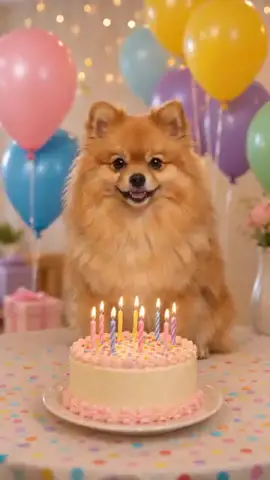
A talking pet video holds one fixed frame: your pet sits in a themed background and speaks. That is the right shape for a birthday wish or an apology, where the message is the whole point.
A vlog is filmed on the move. The camera holds steady, but the world behind your pet keeps going: people walk past on a city street, traffic rolls through, a fire flickers at a campsite, water moves under a paddleboard. That background motion is what makes a clip read as real footage rather than a portrait with a voice on top.
The prop does the rest of the work. Hands free reads as a talking pet. A visible selfie stick or an outstretched paw at the edge of frame reads as a pet who is holding the camera, which is the entire premise of a vlog. If you want the vlogger look specifically, choose the selfie stick and add the clip-on mic.
Frequently Asked Questions
What is a pet vlog generator?
A pet vlog generator turns one photo of your pet into a short vertical video that looks like your pet filmed itself: your pet holds the camera, talks straight to it, and the world keeps moving behind them. In WigglePet this is the Vlog speech template. You write the line, choose the place, the time of day and the prop, and the app generates the clip with your pet’s voice lip-synced to your words.
Can I make my dog or cat a vlogger?
Yes. Any pet works from a single photo: dogs, cats, rabbits, birds, hamsters and more. Your pet’s face, markings and proportions are held to your reference photo in every frame, so the same pet shows up in every episode of your series.
Does the pet hold a selfie stick?
It can. The prop picker offers hands free, a selfie hold at arm’s length where only the outstretched paw shows at the edge of frame, a full selfie stick with a chrome pole running toward the camera, and either held option plus a small clip-on wireless microphone on the chest.
Do I need a video of my pet to start?
No. One clear photo is enough. The scene, the props, the costume and the motion are all generated around it.
How long does a pet vlog video take to make?
A few minutes. You approve the voice and the opening frame first, so you know what you are getting before the video is generated.
What can I do with the finished video?
It comes out vertical 9:16 at roughly 4 to 15 seconds, which is the native format for TikTok, Instagram Reels and YouTube Shorts. Save it, post it, or send it in a family chat.
What is a pet vlog?
A pet vlog is a video where your pet narrates their life from their own point of view, shares thoughts and takes viewers along, just like a human vlogger. What separates it from a plain talking-pet video is that your pet is holding the camera and the world behind them keeps moving.
Are pet vlogs popular on social media?
Yes. Pet POV and pet perspective vlogs do consistently well on TikTok, Instagram Reels and YouTube Shorts, and a recurring vlog series is one of the more reliable ways to build a pet influencer account. Every video comes out vertical 9:16, so nothing needs cropping.
Can I make a day in the life video of my dog?
Yes. Write the line as a running commentary on their routine, describe your home in the Custom scene, and choose the selfie hold so it reads as your dog filming their own day. A dog vlog and a cat vlog are made exactly the same way.
Does my pet have to be travelling, or can they vlog from home?
Either. The ten ready-made scenes are outdoor places, but the Custom scene accepts any location you describe, indoors included. That is how people make room tours, what-I-eat-in-a-day and GRWM episodes instead of travel ones.
Is the pet vlog generator free?
WigglePet is free to download on iOS and Android and includes a free image trial. For pet vlogs, choose a plan with monthly video credits or buy a one-time video credit pack with no subscription. Pack credits never expire.
Start Your Pet's Vlog Today
Download WigglePet free, pick a photo, and send your pet somewhere worth filming.
 Scan to download