
The Best App for Pet TikToks When Your Pet Won’t Perform
Your pet won’t dance on cue. WigglePet doesn’t need it to. Make a talking, singing, dancing or meme video from one photo, vertical and watermark-free, in about two minutes.
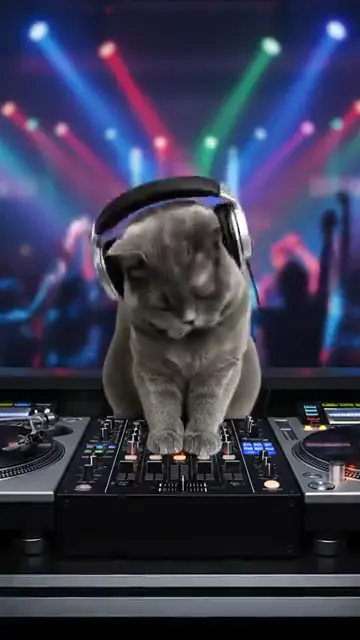
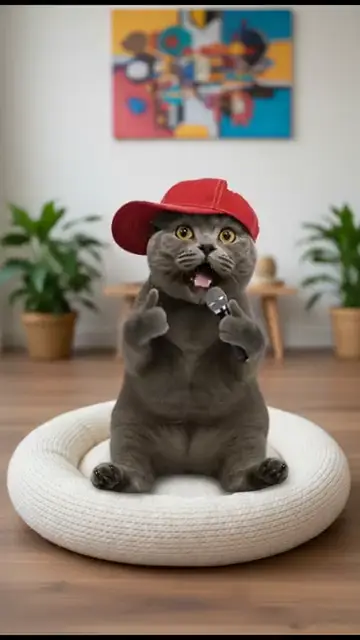
What is the best app for making pet TikToks?
For filming and editing real clips of your pet, a video editor like CapCut or TikTok’s own editor is the standard. For AI pet videos, when you want your pet to talk, sing, dance or star in a meme without filming anything, WigglePet is built for TikTok.
WigglePet is best for vertical 9:16 videos with no watermark, full-body motion that looks good in the feed, two pets in one video, and speed: most videos are ready in 1 to 3 minutes, so you can post while a trend is still hot. Pet meme slideshows come with editable captions in 22 languages.
Many creators use both: make the pet video in WigglePet, then add a trending sound, text or a stitch in TikTok or CapCut.
What WigglePet Is Best For
Best for AI pet videos for TikTok
Talking, singing, dancing and vlog-style videos, vertical and ready to upload.
See how →Best for pet memes
16 meme formats like “Villain era” and “Fit check”, with 5 to 7 captioned scenes of your pet.
See how →Best for jumping on trends fast
About 2 minutes per video, no editing, so the trend is still alive when you post.
See how →Best for two-pet content
Two-Pet Chat and duets: your dog and cat arguing or singing together.
See how →What Makes a Good App for Pet TikToks
Vertical by default
9:16 with nothing cropped off.
No watermark
A watermark from another app makes your post look like a repost.
Fast
Trends move in days. WigglePet takes about 2 minutes per video.
A hook in the first second
A pet talking, singing or dancing is an instant hook.
Formats that repeat
Vlogs, memes, interviews and news-anchor bits make easy series.
Your pet, every time
A recognizable pet builds a following. WigglePet keeps the same look in every video.
How WigglePet Compares
| Feature | WigglePet | ChatGPT / Gemini | CapCut |
|---|---|---|---|
| Uses your real pet | Yes. Add the photo once and WigglePet saves the pet profile | Upload a photo each time; the look can change between results | Uses the footage or photos you supply |
| Vertical 9:16, ready to post | Always, no cropping or editing | Usually you pick or crop the format | You set the format and edit the clip yourself |
| Watermark | None | Depends on the tool and plan | Depends on the template and plan |
| Time per video | 1 to 3 minutes, no editing | Minutes, plus writing prompts and retries | Depends on how much you edit |
| Whole pet moves (body, head, ears, tail) | Yes, in every video type | Possible from a prompt; results vary | Only in some AI templates |
| Says the words you type, with lip-sync | Yes. You hear the voice and can redo it before the video is made | Possible with video models that make sound; the voice comes from the prompt | Adds voiceover or text-to-speech to your clip |
| Two pets in one video | Yes: Two-Pet Chat, Duet and group dances, no photo of them together needed | Possible, but hard to keep both pets looking right | Only if you filmed them together |
| Ready-made ideas | Pet templates for occasions, dances, songs and memes, or describe your own scene | Write your own prompt each time | General edit templates, not made for pets |
| Pay without a subscription | Yes. One-time video credit packs that never expire | Subscription plans | Subscription plans |
ChatGPT and Gemini are general AI assistants that can make images and short videos; CapCut is a video editor with AI effects. They change often and differ by plan, so check them yourself. WigglePet details checked November 2026.
When WigglePet Isn’t the Right Pick
- Editing clips you filmed. Cut, caption and add sounds to real footage in CapCut or the TikTok editor.
- Scheduling and analytics. WigglePet makes the video; use TikTok or a social media tool to schedule and track it.
How to Make a Pet TikTok With WigglePet
- 1
Select your pet
Add a photo once. WigglePet saves your pet.
- 2
Pick a format
Talk, sing, dance, a meme or a vlog, or describe your own scene.
- 3
Post
Download the vertical video and upload it, or add a trending sound in TikTok first.
Frequently Asked Questions
What is the best app for pet TikToks?
For editing real footage, CapCut or TikTok’s own editor. For AI pet videos, WigglePet is built for TikTok: your pet talks, sings, dances or stars in a meme from one photo, in vertical 9:16 with no watermark, usually in 1 to 3 minutes.
Can I use WigglePet and CapCut together?
Yes. Make the pet video in WigglePet, then open it in CapCut or the TikTok editor to add text, a trending sound or other clips.
Are WigglePet videos the right size for TikTok?
Yes. Every WigglePet video is vertical 9:16, the format TikTok, Instagram Reels and YouTube Shorts use.
Do the videos have a watermark?
No. WigglePet videos have no watermark, and you own what you create.
How long does a video take?
Most videos are ready in 1 to 3 minutes, about 2 minutes on average.
Is it free?
WigglePet is free to download with a free image trial. Videos use credits from a plan with monthly video credits or a one-time credit pack with no subscription. Pack credits never expire.
Related Pages
Features and guides for this kind of video.
Your Pet’s Next TikTok
Download WigglePet for free and make a vertical, watermark-free pet video in about two minutes.
 Scan to download